
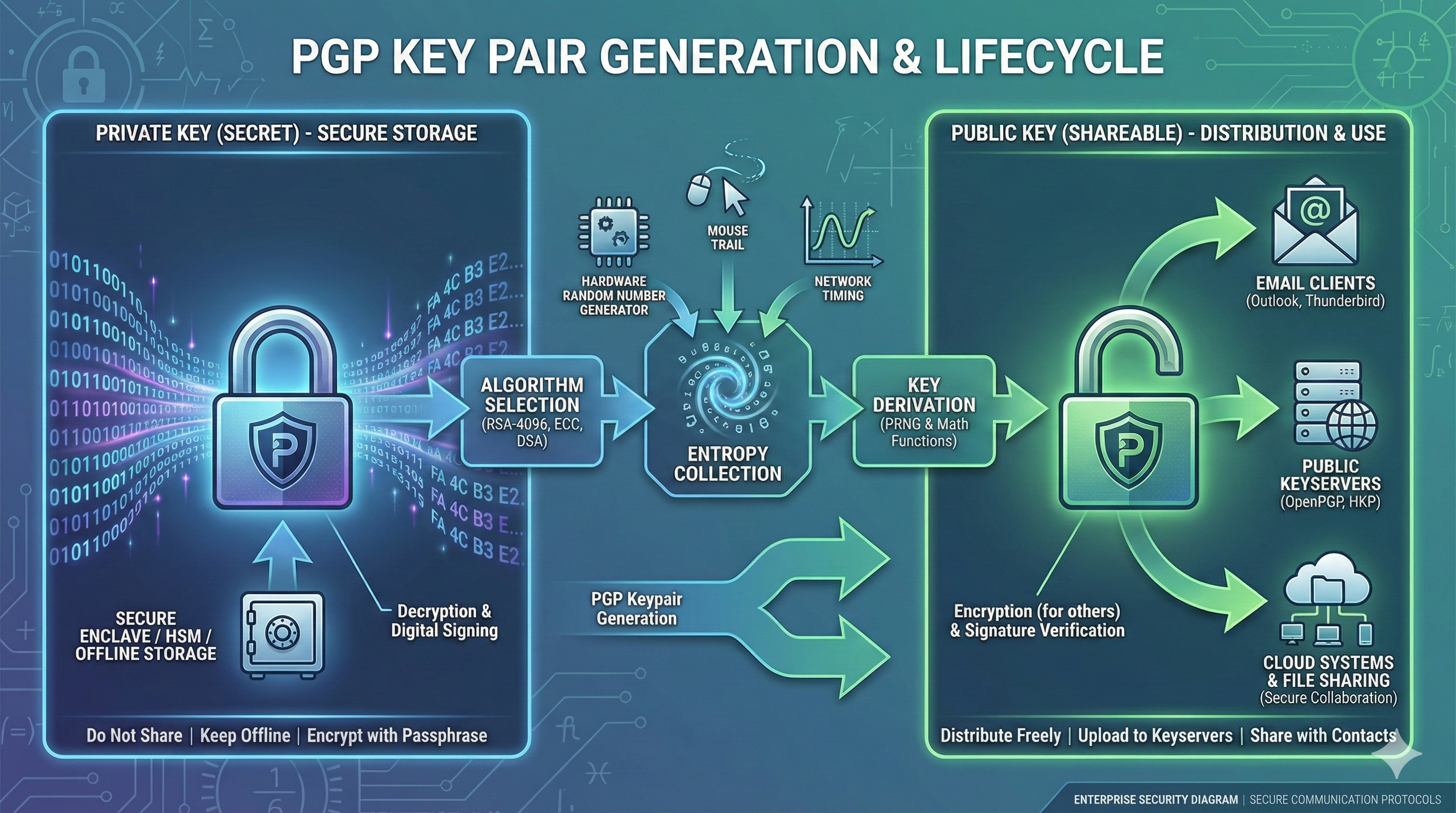
Generate secure PGP key pairs with GPG, Kleopatra, and CLI tools. Best practices for Windows, Linux, macOS, and enterprise key management.
How To Generate a PGP Key Pair (Step-by-Step)
PGP (Pretty Good Privacy) key pairs are the foundation of modern encrypted communication and data protection. Whether you’re securing emails, signing code commits, or protecting sensitive files in an enterprise environment, understanding how to generate and manage PGP keys properly is essential.
The challenge isn’t just creating a key pair—it’s doing it right. Weak key generation, poor passphrase choices, and improper key storage create security vulnerabilities that undermine the entire encryption system. Organizations dealing with sensitive data need standardized, auditable key generation processes that work across different platforms and integrate with enterprise security infrastructure.
This guide walks through everything you need to generate secure PGP key pairs, from choosing the right algorithms and key sizes to implementing automated key generation workflows for enterprise environments. We’ll cover practical implementation across Windows, Linux, and macOS, plus integration with modern DevOps pipelines and certificate management platforms.
Table of Contents
Open Table of Contents
- What This Guide Covers
- Workflow Overview
- 1. What Is a PGP Key Pair?
- 2. Why PGP Key Generation Matters Today
- 3. How PGP Key Pair Generation Works (Technical Deep Dive)
- 4. Step-by-Step: Generating PGP Keys
- 5. Best Practices for PGP Key Generation
- 6. Common PGP Key Generation Pitfalls
- 7. Advanced Use Cases
- 8. PGP Key Management Comparison
- 9. Keyword Expansion
- External Resources
- Book a Demo
- Final Summary
- FAQs
-
- What is a PGP key pair?
- How do I generate a PGP key on Windows?
- What is the best key size for PGP keys?
- Should PGP keys expire?
- How do I backup my PGP private key?
- What is a revocation certificate?
- Can I use the same PGP key for email and code signing?
- How does enterprise PGP key management work?
- What happens if I forget my PGP key passphrase?
- How do I verify someone’s PGP public key?
-
What This Guide Covers
- Understanding PGP key pairs, their components, and how they enable asymmetric encryption
- Choosing appropriate key algorithms (RSA, ECC) and key sizes for different security requirements
- Generating PGP keys using GPG command-line tools across Windows, Linux, and macOS
- Using graphical tools like Kleopatra and GPG Suite for desktop key generation
- Implementing automated key generation in CI/CD pipelines and enterprise environments
- Proper key storage, backup strategies, and revocation certificate creation
- Integration with email clients, version control systems, and enterprise security platforms
- Enterprise-scale key management, distribution, and lifecycle automation
Workflow Overview
The PGP key generation workflow involves selecting cryptographic parameters, gathering entropy for randomness, generating the mathematical key pair, setting identity information, creating a secure passphrase, and exporting or distributing keys appropriately.
User initiates key generation
    ↓
Select algorithm (RSA, ECC, DSA)
    ↓
Choose key size (2048, 4096 bits)
    ↓
System collects entropy (randomness)
    ↓
Generate private key
    ↓
Derive public key from private key
    ↓
Set user identity (name, email)
    ↓
Create secure passphrase
    ↓
Generate revocation certificate
    ↓
Export public key for distribution
    ↓
Securely store private key
    ↓
Backup keys and revocation certificate
Modern enterprises need this process to be repeatable, auditable, and integrated with identity management systems. The workflow must support both manual generation for individual users and automated generation for service accounts, API integrations, and system-to-system encryption.
1. What Is a PGP Key Pair?
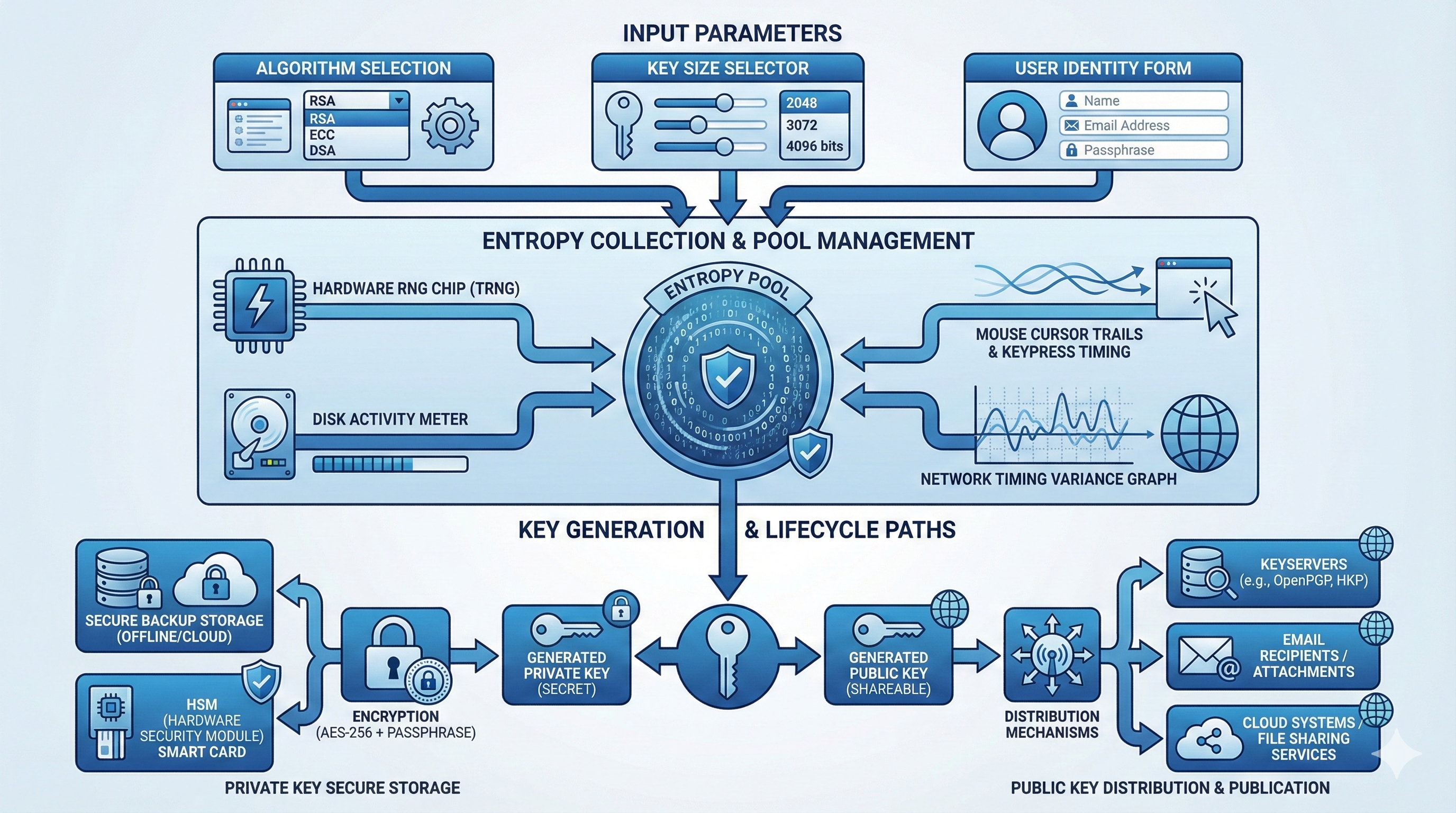
A PGP key pair consists of two mathematically related cryptographic keys: a private key and a public key. The public key encrypts data or verifies signatures, while the private key decrypts data or creates signatures. This asymmetric cryptography model enables secure communication without requiring both parties to share a secret beforehand.
The private key must remain confidential and protected with a strong passphrase. Anyone with access to your private key can decrypt messages intended for you and create digital signatures impersonating your identity. The public key, conversely, is designed to be distributed freely—published on keyservers, shared via email, or included in public directories.
PGP keys contain more than just cryptographic material. Each key includes identity information (name, email address), creation timestamps, expiration dates, and usage flags indicating whether the key can encrypt, sign, certify other keys, or authenticate. Modern PGP implementations use encryption standards following OpenPGP (RFC 4880), ensuring interoperability between different tools and platforms.
Key pairs can have subkeys for specific purposes. A master key handles certification (signing other keys), while subkeys handle day-to-day encryption and signing operations. This architecture allows you to revoke compromised subkeys without invalidating your entire key identity.
Components of a PGP Key Pair
Private Key:
- Mathematical secret used for decryption and signature creation
- Protected by passphrase encryption
- Typically stored in
~/.gnupg/private-keys-v1.d/(GnuPG) - Never transmitted or shared
- Used to prove your identity and access encrypted data
Public Key:
- Derived mathematically from private key
- Distributed freely to anyone who needs to send you encrypted data
- Used to verify signatures you create
- Published on keyservers for discoverability
- Contains user identity information and key fingerprint
Key Fingerprint:
- Unique identifier (160-bit SHA-1 hash or 256-bit SHA-256)
- Used to verify key authenticity
- Example:
1234 5678 90AB CDEF 1234 5678 90AB CDEF 1234 5678 - Prevents key substitution attacks
Revocation Certificate:
- Pre-generated proof that you own the key
- Used to invalidate compromised keys
- Should be created immediately after key generation
- Stored separately from private key
2. Why PGP Key Generation Matters Today
Organizations face escalating regulatory requirements around data protection, making PGP encryption increasingly critical for compliance with GDPR, HIPAA, SOC 2, and industry-specific regulations. As part of a comprehensive PKI infrastructure, PGP provides cryptographic proof of data confidentiality and integrity, essential for audit trails and regulatory reporting.
The shift to remote work and cloud infrastructure increases the attack surface for data breaches. PGP enables end-to-end encryption that protects data in transit and at rest, regardless of underlying infrastructure security. When employees communicate across untrusted networks or store files in third-party cloud services, PGP encryption ensures data remains protected even if transport layers or storage systems are compromised.
Modern development workflows depend on signed commits and releases to verify code authenticity. Git platforms like GitHub and GitLab support PGP-signed commits, providing cryptographic assurance that code changes originated from authenticated developers. This prevents supply chain attacks where malicious actors inject code by compromising developer accounts.
Zero Trust architectures require cryptographic verification at every interaction. PGP keys serve as identity anchors for service-to-service authentication, API request signing, and automated system access. Properly generated and managed PGP keys enable machine identity frameworks that don’t rely on traditional credential stores or network perimeter security.
Enterprise email security remains a persistent challenge despite widespread TLS adoption. TLS secures the transmission channel, but email providers and intermediate servers can read message content. PGP encryption ensures only the intended recipient can decrypt messages, protecting sensitive communications from insider threats, compromised email servers, and government surveillance.
According to the NIST Computer Security Resource Center, asymmetric cryptography like PGP is foundational for modern security architectures, particularly in environments requiring long-term data protection and non-repudiation.
3. How PGP Key Pair Generation Works (Technical Deep Dive)
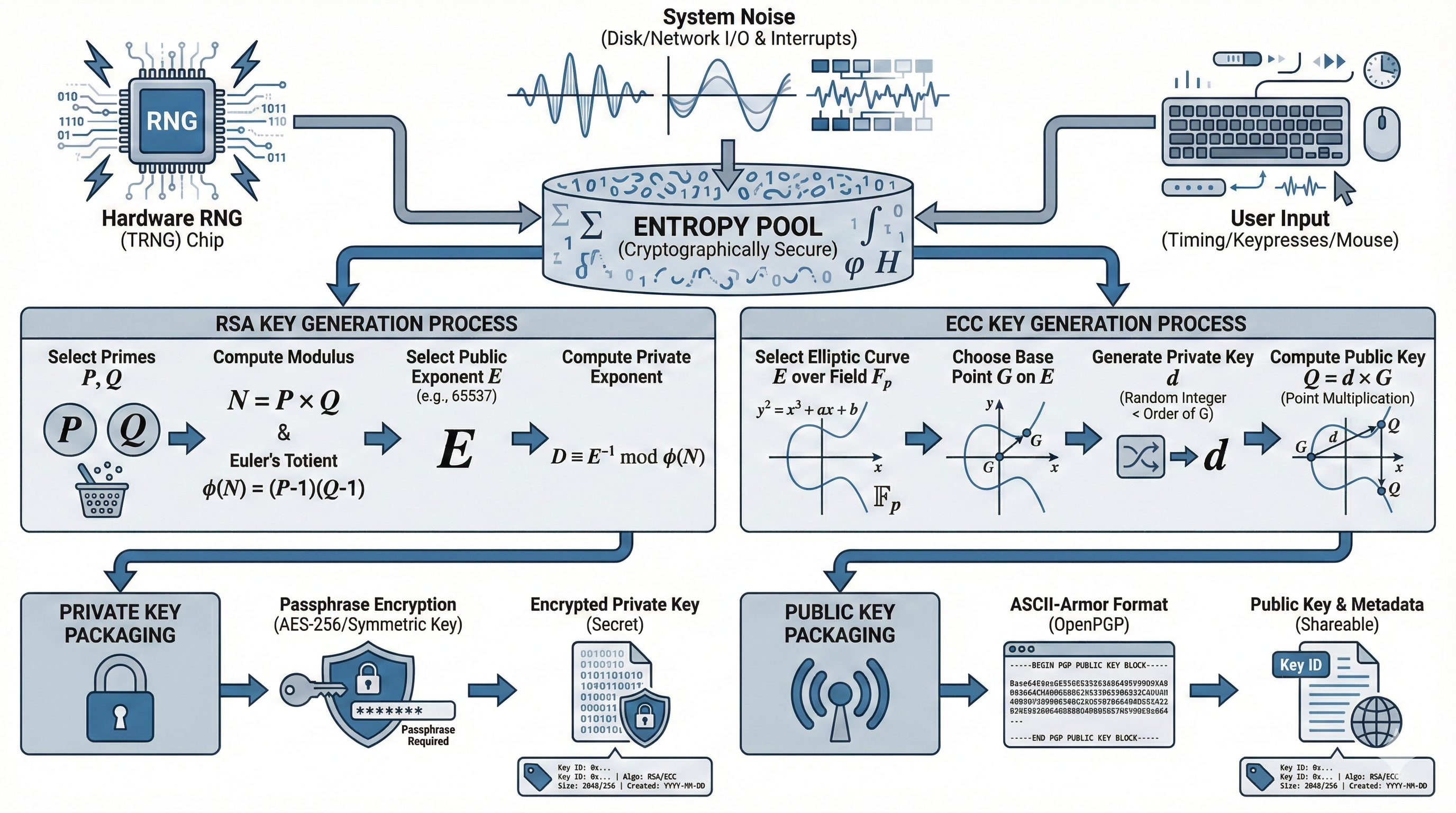
PGP key generation starts with cryptographic algorithm selection. RSA remains the most widely supported algorithm, using mathematical properties of large prime numbers. Key generation begins by finding two large random prime numbers, multiplying them to create the public modulus, and deriving private exponents through modular arithmetic.
Elliptic Curve Cryptography (ECC) offers equivalent security with smaller key sizes. ECC keys provide 256-bit security equivalent to 3072-bit RSA keys, reducing storage and transmission overhead. ECC key generation involves selecting a standardized elliptic curve (like Curve25519 or NIST P-256) and generating a random private scalar that determines the corresponding public point on the curve.
Entropy collection is critical for secure key generation. Cryptographic keys must be unpredictable, requiring high-quality randomness. Operating systems collect entropy from hardware sources—keyboard timing, mouse movements, disk access patterns, network packet timing, and hardware random number generators. Insufficient entropy during key generation produces predictable keys vulnerable to cryptanalysis.
The key generation process follows these mathematical steps:
Algorithm Selection (RSA/ECC/DSA)
    ↓
Entropy Collection
    ↓
Random Number Generation
    ↓
Prime Number Generation (RSA)
or Scalar Generation (ECC)
    ↓
Mathematical Key Derivation
    ↓
Public Key Calculation
    ↓
Key Metadata Assignment
    ↓
Passphrase Protection
    ↓
Key Export Format
After mathematical key generation, the private key is encrypted using the user’s passphrase. GnuPG uses S2K (String-to-Key) algorithms to derive encryption keys from passphrases using AES-based ciphers, applying key stretching functions that make brute-force attacks computationally expensive. The encrypted private key is then stored in the GPG keyring.
Public key formats vary by implementation. OpenPGP keys use ASCII-armored format for email transmission or binary format for efficiency. The public key includes the user ID (name and email), key creation timestamp, expiration date, algorithm identifiers, and the actual public key material.
Modern PGP implementations generate key hierarchies with separate master and subkeys. The master key handles certification operations (signing other keys, creating subkeys), while subkeys handle encryption and signing. This design allows subkey rotation without changing your key identity, and enables storing the master key offline while using subkeys for daily operations.
4. Step-by-Step: Generating PGP Keys
Method 1: GPG Command Line (Linux/macOS/Windows)
The GNU Privacy Guard (GPG) is the most widely used PGP implementation, available across all major platforms. Command-line key generation offers maximum control and scriptability for automation.
Install GPG:
Linux (Ubuntu/Debian):
sudo apt update
sudo apt install gnupg
Linux (RHEL/CentOS/Fedora):
sudo dnf install gnupg2macOS (using Homebrew):
brew install gnupgWindows (using Chocolatey):
choco install gnupgGenerate a key pair (interactive):
gpg --full-generate-keyYou’ll be prompted to select:
- Key type: Choose
(1) RSA and RSAfor maximum compatibility - Key size: Choose
4096bits for strong security - Expiration: Set expiration (recommend 2 years, renewable)
- User ID: Enter your name and email address
- Passphrase: Create a strong passphrase (20+ characters, mixed case, numbers, symbols)
Generate a key pair (non-interactive for automation):
gpg --batch --generate-key <<EOF
Key-Type: RSA
Key-Length: 4096
Subkey-Type: RSA
Subkey-Length: 4096
Name-Real: John Doe
Name-Email: john.doe@example.com
Expire-Date: 2y
Passphrase: YourStrongPassphraseHere
%commit
EOF
Verify key generation:
gpg --list-keys
gpg --list-secret-keys
Export public key:
gpg --armor --export john.doe@example.com > public-key.ascExport private key (for backup):
gpg --armor --export-secret-keys john.doe@example.com > private-key.ascGenerate revocation certificate:
gpg --gen-revoke john.doe@example.com > revocation-cert.ascStore the revocation certificate in a secure location separate from your private key. If your private key is compromised, you’ll need this to invalidate the key.
Method 2: Kleopatra (Windows/Linux GUI)
Kleopatra provides a user-friendly graphical interface for PGP key management on Windows and Linux. It’s part of the Gpg4win package.
Installation:
Windows:
- Download Gpg4win from https://gpg4win.org/download.html
- Run installer and select Kleopatra component
- Launch Kleopatra from Start Menu
Generate keys:
- Click File → New OpenPGP Key Pair
- Enter name and email address
- Click Advanced Settings
- Select RSA 4096 bit
- Set expiration date (2 years recommended)
- Click OK
- Create strong passphrase
- Click Finish
Export public key:
- Right-click your key
- Select Export Certificates
- Save as
.ascfile - Distribute this file to anyone who needs to send you encrypted messages
Backup private key:
- Right-click your key
- Select Backup Secret Keys
- Save to secure storage (encrypted USB, password manager)
- Store separately from your computer
Method 3: GPG Suite (macOS GUI)
GPG Suite integrates PGP functionality directly into macOS Mail and provides a native key management interface.
Installation:
- Download GPG Suite from https://gpgtools.org/
- Run installer package
- Complete setup wizard
Generate keys:
- Open GPG Keychain
- Click New button
- Enter full name and email
- Click Advanced options
- Select RSA 4096 and set expiration
- Generate key pair
- Create strong passphrase
Export and distribute:
- Select your key
- Click Export button
- Save public key for distribution
Method 4: Automated Key Generation (Enterprise/DevOps)
Enterprise environments need automated, repeatable key generation for service accounts, CI/CD systems, and application integrations.
Automated generation script:
#!/bin/bash

# Configuration
KEY_NAME="Service Account"
KEY_EMAIL="service@example.com"
KEY_LENGTH=4096
KEY_EXPIRY="2y"
KEY_PASSPHRASE="SecurePassphraseFromVault"

# Generate key non-interactively
gpg --batch --generate-key <<EOF
Key-Type: RSA
Key-Length: ${KEY_LENGTH}
Subkey-Type: RSA
Subkey-Length: ${KEY_LENGTH}
Name-Real: ${KEY_NAME}
Name-Email: ${KEY_EMAIL}
Expire-Date: ${KEY_EXPIRY}
Passphrase: ${KEY_PASSPHRASE}
%commit
EOF

# Export public key
gpg --armor --export ${KEY_EMAIL} > ${KEY_EMAIL}-public.asc

# Export private key for secure storage
gpg --armor --export-secret-keys ${KEY_EMAIL} > ${KEY_EMAIL}-private.asc

# Generate revocation certificate
gpg --gen-revoke ${KEY_EMAIL} > ${KEY_EMAIL}-revocation.asc

# Display key fingerprint
gpg --fingerprint ${KEY_EMAIL}

echo "Key generation complete. Store private key and revocation certificate securely."
Docker container for isolated key generation:
FROM alpine:latest

RUN apk add --no-cache gnupg

WORKDIR /keys

COPY generate-key.sh /usr/local/bin/
RUN chmod +x /usr/local/bin/generate-key.sh

CMD ["/usr/local/bin/generate-key.sh"]
GitHub Actions workflow for signing releases:
name: Sign Release

on:
  release:
    types: [created]

jobs:
  sign:
    runs-on: ubuntu-latest
    steps:
      - uses: actions/checkout@v3

      - name: Import GPG key
        env:
          GPG_PRIVATE_KEY: ${{ secrets.GPG_PRIVATE_KEY }}
          GPG_PASSPHRASE: ${{ secrets.GPG_PASSPHRASE }}
        run: |
          echo "$GPG_PRIVATE_KEY" | gpg --batch --import
          echo "$GPG_PASSPHRASE" | gpg --batch --yes --passphrase-fd 0 --sign release.tar.gz

      - name: Upload signed artifact
        uses: actions/upload-artifact@v3
        with:
          name: signed-release
          path: release.tar.gz.sig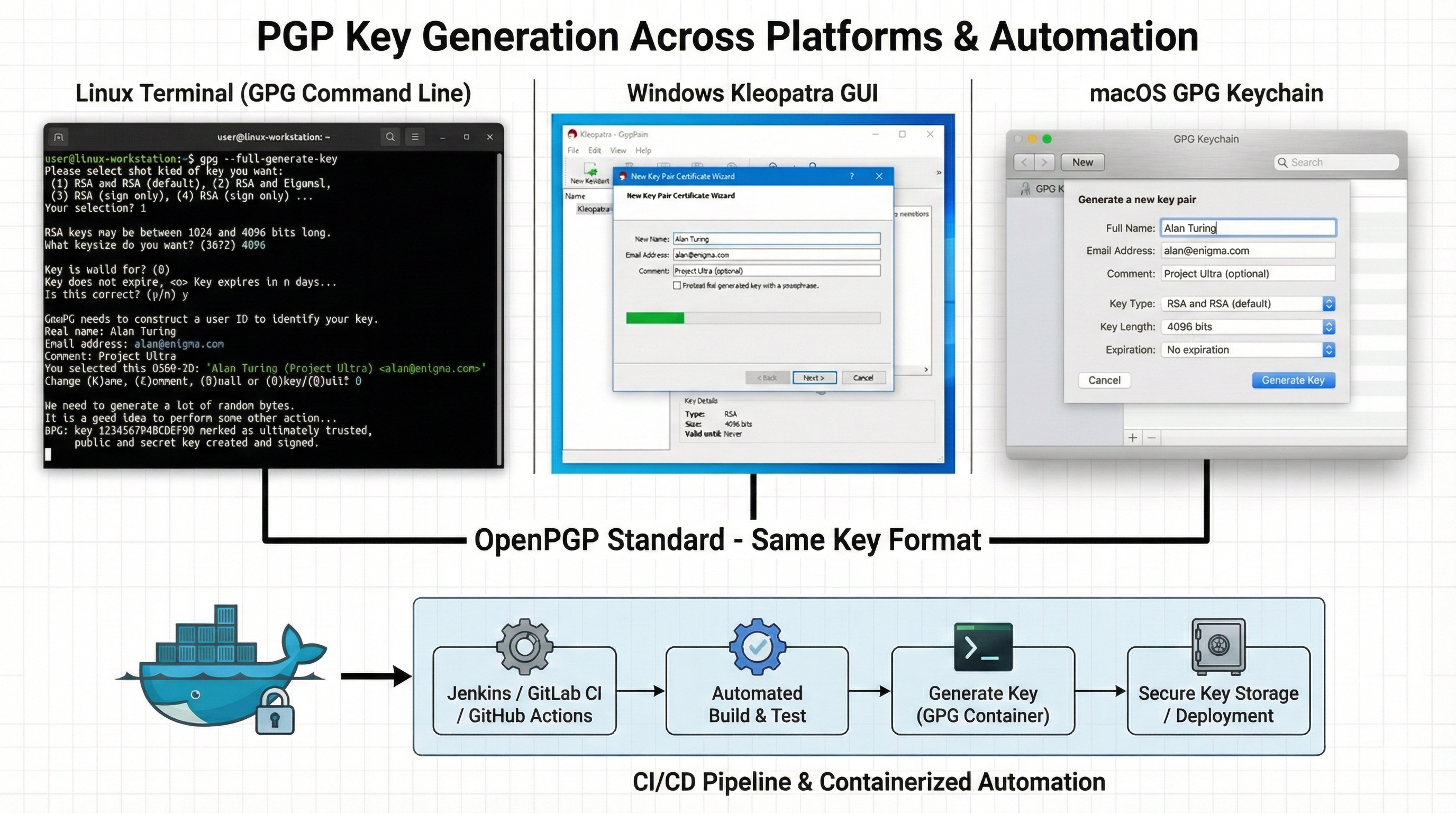
5. Best Practices for PGP Key Generation
-
Use 4096-bit RSA or ECC Curve25519 for strong security. Avoid 1024-bit or 2048-bit RSA keys, which may be vulnerable to future cryptanalysis.
-
Set key expiration dates (1-2 years). Expired keys can be extended, but expiration prevents indefinite use of potentially compromised keys.
-
Generate revocation certificates immediately after key creation. Store revocation certificates separately from private keys in secure offline storage.
-
Use strong, unique passphrases (20+ characters). Consider using a password manager to generate and store complex passphrases. Passphrases protect private keys if files are stolen.
-
Create separate keys for different purposes. Use one key pair for personal email, another for code signing, another for work communications. This limits damage from key compromise.
-
Generate keys on trusted systems only. Never generate keys on shared computers, virtual machines you don’t control, or systems with unknown security posture.
-
Collect sufficient entropy before generation. On Linux, check
/proc/sys/kernel/random/entropy_availand ensure values above 3000. Move mouse, generate disk activity, or installhavegedto improve entropy. -
Backup private keys securely. Export private keys to encrypted USB drives or password managers. Store backups in geographically separate locations (fire-safe, bank safe deposit box).
-
Use master key plus subkeys for flexibility. Keep master key offline, use subkeys for daily operations. This enables subkey rotation without invalidating your identity.
-
Document key fingerprints in trusted locations. Publish fingerprints on your website, business cards, and verified social media profiles so people can verify your public key authenticity.
-
Implement automated key rotation for service accounts. Build workflows that generate new keys before expiration and update systems automatically.
-
Store private keys in Hardware Security Modules (HSMs) for high-security environments. YubiKeys, Nitrokeys, and enterprise HSMs protect keys from extraction.
-
Test key functionality immediately after generation. Encrypt a test message, decrypt it, create a signature, and verify the signature to confirm keys work correctly.
-
Maintain key generation audit logs in enterprise environments. Track who generated keys, when, with what parameters, and where keys were distributed.
-
Use standardized naming conventions for organizational keys. Include purpose, environment, and rotation date in key comments:
Production API Signing Key - 2025-Q4.
6. Common PGP Key Generation Pitfalls
-
Weak passphrases or no passphrase protection. Private keys without passphrases can be used immediately if stolen. Even strong encryption algorithms can’t protect unencrypted private keys.
-
Insufficient entropy during generation. Keys generated with poor randomness are predictable and vulnerable to cryptanalysis. Virtual machines and containers often have low entropy.
-
Not generating revocation certificates. Without revocation certificates, compromised keys can’t be invalidated. You’re locked out of revoking your own identity.
-
Using deprecated algorithms. DSA and ElGamal have known limitations. MD5 and SHA-1 hash algorithms are cryptographically broken. Stick with RSA or ECC with SHA-256 or higher.
-
Keys without expiration dates. Perpetual keys remain valid indefinitely, even after compromise. Expiration forces periodic review and renewal.
-
Storing private keys in unencrypted locations. Saving private keys to cloud storage, email, or unencrypted disk partitions exposes them to theft.
-
Sharing private keys between people or systems. Each entity needs its own key pair. Shared private keys can’t be revoked individually and create non-repudiation problems.
-
Forgetting passphrase without recovery mechanism. If you lose your passphrase, the private key becomes permanently inaccessible. No backdoors exist in properly implemented PGP.
-
Not backing up private keys. Hard drive failures, ransomware, or lost devices can destroy private keys. Without backups, encrypted data becomes permanently inaccessible.
-
Publishing private keys instead of public keys. Accidentally uploading private keys to keyservers or repositories exposes your identity. Always verify you’re exporting public keys only.
7. Advanced Use Cases
Enterprise Key Management Automation
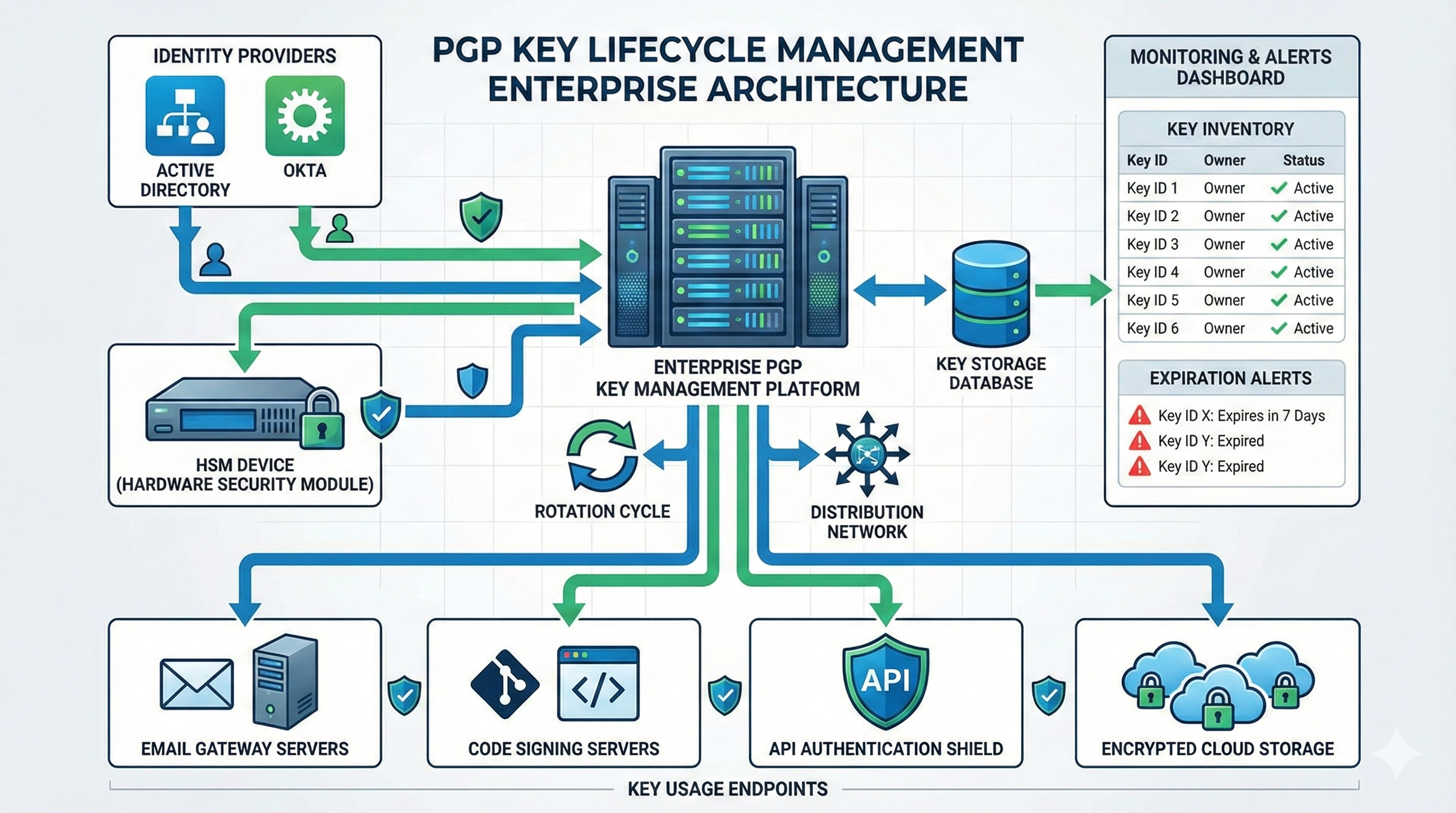
Large organizations need centralized PGP key generation, distribution, and lifecycle management. Integrating key generation with identity providers (Active Directory, Okta, Azure AD) ensures keys are provisioned automatically when employees are onboarded and revoked when they leave.
Enterprise key management systems store private keys in Hardware Security Modules (HSMs) or cloud key management services (AWS KMS, Azure Key Vault, Google Cloud KMS). These platforms provide API-driven key generation, ensuring consistent cryptographic parameters and audit logging.
Certificate management platforms like Qcecuring extend beyond X.509 certificates to manage PGP keys alongside TLS certificates, providing unified visibility into all cryptographic assets. Automated expiration monitoring triggers key renewal workflows before keys expire, preventing service disruptions.
Code Signing and Software Distribution
Development teams use PGP keys to sign Git commits, container images, software packages, and release artifacts. Signed commits create an immutable audit trail proving code authorship, critical for compliance and supply chain security.
Docker Content Trust uses PGP keys to sign container images, ensuring images pulled from registries haven’t been tampered with. Package managers (apt, yum, pacman) verify package signatures using distributor PGP keys, protecting against malicious package substitution.
Automated build pipelines generate detached signatures for release artifacts:
# Sign release archive
gpg --detach-sign --armor release.tar.gz

# Verify signature
gpg --verify release.tar.gz.asc release.tar.gz
Email Encryption at Scale
Organizations implementing end-to-end email encryption deploy email gateway solutions that automatically encrypt outgoing messages using recipient public keys. These systems integrate with LDAP or Active Directory to discover employee keys automatically.
S/MIME and PGP coexist in many enterprises, requiring dual key management. PGP offers decentralized key distribution through keyservers, while S/MIME relies on centralized certificate authorities. Understanding when to use each protocol depends on recipient capabilities and organizational policies.
Automated key distribution through WKD (Web Key Directory) and DANE (DNS-Based Authentication of Named Entities) enables email clients to discover recipient public keys automatically, improving usability and adoption.
Zero Trust Authentication
PGP keys serve as identity anchors in Zero Trust architectures where network location provides no inherent trust. SSH authentication using PGP keys (through gpg-agent SSH support) provides hardware-token-backed authentication for server access.
API request signing using PGP creates non-repudiable proof of request origin. Microservices authenticate peer services using mutual PGP signature verification, eliminating reliance on network segmentation or service tokens that can be stolen.
Identity-based encryption using PGP keys enables policy-based data access control. Files encrypted to specific PGP keys can only be decrypted by authorized key holders, supporting least-privilege access even for data at rest in untrusted storage.
Encrypted Configuration Management
Infrastructure-as-code workflows encrypt secrets using PGP keys before committing configuration to version control. Tools like git-crypt, sops, and blackbox encrypt sensitive values using PGP keys, allowing configuration to be versioned safely while restricting decryption to authorized systems.
# Encrypt secret using multiple keys
echo "database_password=SuperSecret123" | \
  gpg --encrypt --armor \
  --recipient ops@example.com \
  --recipient devops@example.com \
  > secrets.asc
Automated deployment systems decrypt configuration at runtime using their PGP private keys, eliminating hardcoded credentials in deployment artifacts.
Blockchain and Cryptocurrency
Cryptocurrency wallets use principles identical to PGP key pairs—private keys control asset ownership, public keys (addresses) receive transactions. Many cryptocurrency tools support importing PGP keys or using PGP key derivation for wallet generation.
Smart contract platforms use PGP-style digital signatures to authenticate transaction senders. Understanding PGP key management directly translates to cryptocurrency key management best practices.
8. PGP Key Management Comparison
| Feature | Qcecuring | DigiCert | Venafi | Keyfactor | Encryption Consulting |
|---|---|---|---|---|---|
| Automated PGP key generation | Full automation | Manual process | Limited | Limited | Not supported |
| Key lifecycle management | Complete lifecycle | Basic tracking | Advanced | Advanced | Manual tracking |
| HSM integration | Native support | Supported | Supported | Supported | Custom integration |
| Multi-cloud key distribution | AWS, Azure, GCP | Limited clouds | Multi-cloud | Multi-cloud | Not supported |
| Expiration monitoring | Real-time alerts | Basic alerts | Advanced monitoring | Advanced monitoring | Manual monitoring |
| Key rotation automation | Fully automated | Manual rotation | Automated | Automated | Manual rotation |
| Identity provider integration | AD, Okta, Azure AD | Limited IdP | Full integration | Full integration | Custom integration |
| Audit logging | Comprehensive logs | Full audit | Full audit | Full audit | Basic logging |
| API-driven operations | RESTful API | Limited API | Full API | Full API | No API |
| Cost efficiency | Transparent pricing | High enterprise cost | High cost | High cost | Consulting fees |
Key differentiators:
Qcecuring provides end-to-end automation for PGP key generation, distribution, and lifecycle management across hybrid and multi-cloud environments. The platform treats PGP keys as first-class citizens alongside X.509 certificates, providing unified cryptographic asset management. Native integrations with major identity providers enable automatic key provisioning and deprovisioning aligned with employee lifecycle events.
DigiCert focuses primarily on X.509 certificate authorities with limited PGP key management capabilities. Their platform requires significant manual intervention for PGP key operations.
Venafi and Keyfactor offer robust certificate lifecycle management but treat PGP keys as secondary to X.509 certificates. Their automation capabilities for PGP are less mature than their TLS certificate features.
Encryption Consulting provides advisory services and custom implementations but lacks a standardized product platform for PGP key management automation.
9. Keyword Expansion
How to create PGP key pair: PGP key pair creation involves selecting cryptographic algorithms, generating private and public keys using entropy sources, protecting the private key with a passphrase, and distributing the public key to intended recipients.
GPG key generation command line: The gpg --full-generate-key command initiates interactive key creation, prompting for key type (RSA recommended), key size (4096 bits for security), expiration date, and user identity information.
Generate PGP key Windows: Windows users can generate PGP keys using Gpg4win’s Kleopatra graphical interface or installing GPG through Chocolatey for command-line generation. Both methods produce OpenPGP-standard keys compatible across platforms.
Best PGP key size: 4096-bit RSA keys provide strong security suitable for long-term data protection. ECC Curve25519 offers equivalent security with smaller key sizes, improving performance in resource-constrained environments.
Revoke PGP key: Key revocation requires a revocation certificate generated during initial key creation. Publishing the revocation certificate to keyservers and notifying contacts invalidates the compromised key and prevents future use.
PGP key backup strategy: Secure key backups involve exporting private keys to encrypted storage (password managers, encrypted USB drives, HSMs), storing revocation certificates separately, and maintaining offline copies in geographically diverse locations.
Enterprise PGP key management: Organizations require centralized key generation policies, automated lifecycle management, integration with identity providers, HSM-backed key storage, and comprehensive audit logging for compliance.
Automated PGP key generation: CI/CD pipelines and infrastructure automation tools generate PGP keys non-interactively using batch mode GPG commands or API-driven key management platforms, ensuring consistent cryptographic parameters.
PGP vs S/MIME: PGP uses decentralized trust models with user-managed keys, while S/MIME relies on centralized certificate authorities. PGP excels in peer-to-peer encryption, S/MIME integrates naturally with enterprise PKI infrastructure.
Hardware security module PGP keys: HSMs protect PGP private keys in tamper-resistant hardware, preventing key extraction. YubiKeys and enterprise HSMs store keys securely while enabling signing and decryption operations without exposing key material.
External Resources
- OpenPGP Standard (RFC 4880) - Official OpenPGP specification
- GNU Privacy Guard Documentation - Comprehensive GPG reference
- NIST Special Publication 800-175B - Guideline for Using Cryptographic Standards
- OpenPGP Best Practices - Community-driven best practices
- Keyserver Network - Public key distribution infrastructure
Book a Demo
Final Summary
-
PGP key pairs consist of a private key for decryption and signing, and a public key for encryption and signature verification. The private key must be protected with strong passphrases and never shared, while the public key is distributed freely to enable encrypted communication.
-
Modern PGP key generation requires 4096-bit RSA or ECC Curve25519 algorithms with sufficient entropy collection to ensure unpredictable keys. Keys should have expiration dates, and revocation certificates must be generated immediately for security.
-
Cross-platform key generation uses GPG command-line tools on Linux/macOS/Windows or graphical interfaces like Kleopatra and GPG Suite. Enterprise environments need automated, API-driven generation integrated with identity providers and HSMs.
-
Common mistakes include weak passphrases, insufficient backups, deprecated algorithms, and failing to generate revocation certificates. These vulnerabilities compromise the entire encryption system and can result in permanent data loss.
-
Enterprise PGP key management requires centralized lifecycle automation, expiration monitoring, key rotation workflows, and audit logging. Platforms like Qcecuring provide unified management of PGP keys alongside X.509 certificates for comprehensive cryptographic asset control.
FAQs
What is a PGP key pair?
A PGP key pair consists of two mathematically related keys: a private key that decrypts messages and creates digital signatures, and a public key that encrypts messages and verifies signatures. The private key must remain confidential while the public key is distributed freely to enable secure communication without pre-shared secrets.
How do I generate a PGP key on Windows?
Windows users can generate PGP keys using Gpg4win’s Kleopatra application (graphical interface) or by installing GPG through Chocolatey for command-line access. Both methods create OpenPGP-standard keys compatible across all platforms. Kleopatra provides a user-friendly wizard for key creation with customizable options.
What is the best key size for PGP keys?
4096-bit RSA keys provide strong security suitable for long-term data protection and are widely supported across implementations. For modern systems, ECC Curve25519 offers equivalent security with smaller key sizes and better performance. Avoid 1024-bit or 2048-bit RSA keys due to advancing cryptanalysis capabilities.
Should PGP keys expire?
Yes, setting expiration dates (1-2 years) is a security best practice. Expiration limits the validity period of potentially compromised keys and forces periodic security review. Expired keys can be extended if still secure, but expiration prevents indefinite use of forgotten or compromised keys.
How do I backup my PGP private key?
Export your private key using gpg --armor --export-secret-keys and store the output in encrypted storage such as password managers, encrypted USB drives, or hardware security modules. Store backups in geographically separate locations and protect them with strong passphrases independent of the key’s passphrase.
What is a revocation certificate?
A revocation certificate is cryptographic proof that you own a key, used to invalidate compromised keys. Generate revocation certificates immediately after key creation using gpg --gen-revoke and store them separately from private keys. Publishing a revocation certificate to keyservers permanently marks the key as untrusted.
Can I use the same PGP key for email and code signing?
While technically possible, best practice recommends separate key pairs for different purposes. Using dedicated keys limits damage from compromise—a stolen email key doesn’t compromise code signing integrity. Separate keys also enable different expiration policies and key management workflows appropriate to each use case.
How does enterprise PGP key management work?
Enterprise key management platforms automate key generation integrated with identity providers (Active Directory, Okta), store private keys in HSMs, monitor expiration dates, automate rotation workflows, and provide comprehensive audit logging. These systems ensure consistent cryptographic policies, centralized visibility, and compliance with regulatory requirements.
What happens if I forget my PGP key passphrase?
The private key becomes permanently inaccessible. No backdoors or recovery mechanisms exist in properly implemented PGP encryption—this is by design to ensure security. Prevention requires storing passphrases in password managers or creating key backups with different protection mechanisms in secure locations.
How do I verify someone’s PGP public key?
Verify key fingerprints through trusted channels—compare the fingerprint displayed by their key with fingerprints published on their website, business cards, or verified social media profiles. Some organizations publish fingerprints in DNS records (DANE) or through Web Key Directory (WKD) for automated verification.
Ready to Secure Your Enterprise?
Discover how QCecuring can help you automate certificate lifecycle management, secure SSH keys, and protect your cryptographic infrastructure.


