

How SSL and TLS certificates secure websites, identities, and encrypted communication
SSL/TLS certificates are the foundation of Internet security. When you see “HTTPS” in a website URL or a lock icon in your browser — a digital certificate is proving identity and encrypting data between you and the server.
Enterprises rely on TLS certificates to protect customers, APIs, mobile apps, cloud workloads, and machine identities. Without SSL/TLS, attackers could easily tamper with traffic, impersonate websites, or steal login credentials.
This guide explains how SSL/TLS certificates work, the types of certificates, how trust is validated, and best practices for lifecycle automation in modern cloud environments.
What This Guide Covers
- Meaning of SSL certificates and how they work
- TLS vs SSL — what changed and why SSL is deprecated
- HTTPS, encryption, and server identity
- Certificate Authorities and trust chain
- Single-domain, wildcard, multi-domain, and EV certificates explained
- Expiry, revocation and common failures
- Cloud-native management and Zero Trust alignment
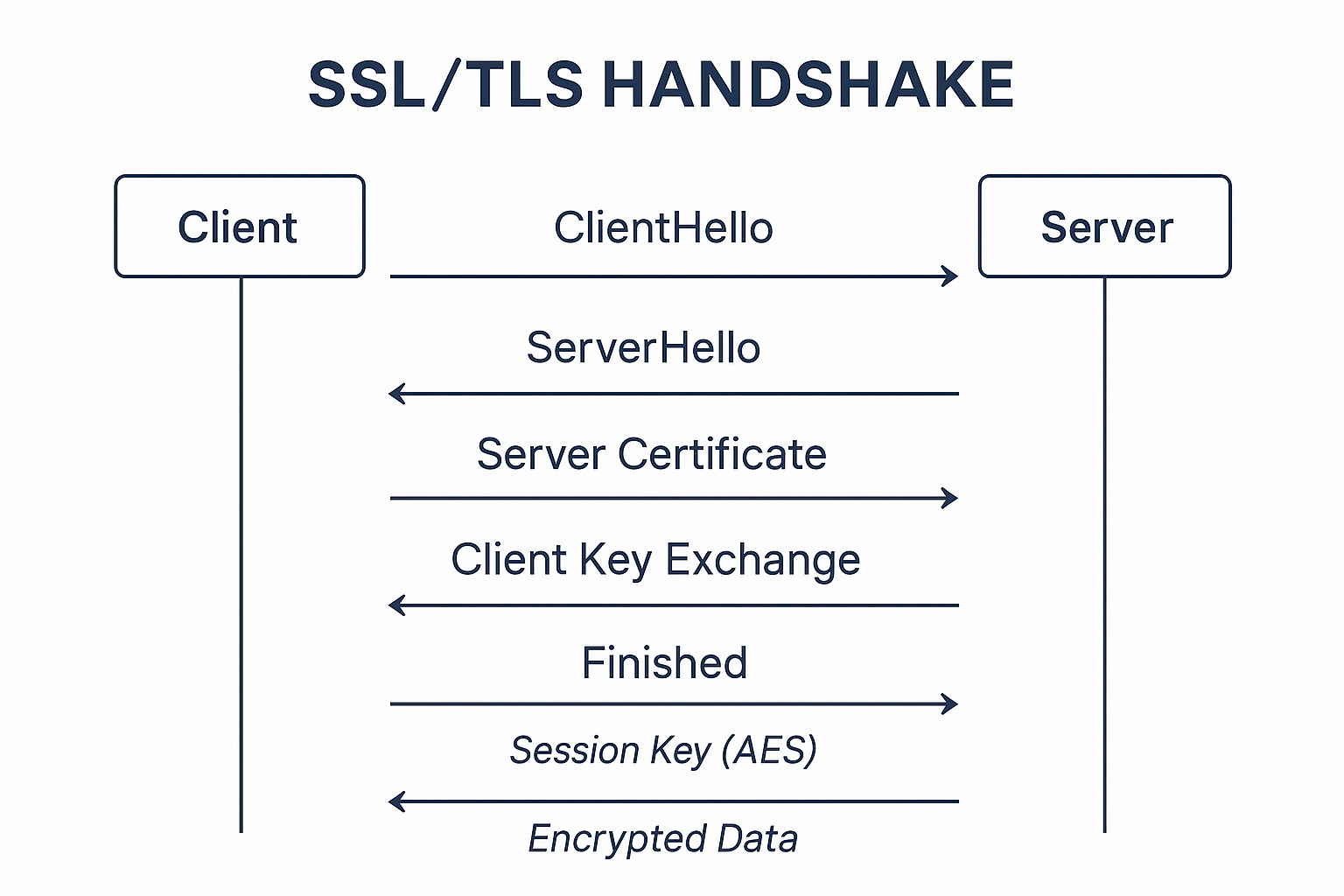
SSL/TLS Handshake Diagram
1. What Are SSL/TLS Certificates?
An SSL/TLS certificate is a digital credential that:
- Confirms the identity of a domain/server
- Enables encrypted HTTPS communication
It binds a domain name to a public key using a signature from a trusted Certificate Authority (CA).
| Function | Description |
|---|---|
| Authentication | Ensures the server is who it claims to be |
| Encryption | Protects data in transit using secure cryptography |
| Integrity | Prevents tampering and man-in-the-middle attacks |
SSL (Secure Socket Layer) is outdated, replaced by TLS (Transport Layer Security) — but “SSL certificate” remains the common name.
2. Why SSL/TLS Matters Today
For every organization operating online:
- Protects user privacy and data security
- Establishes trust via identity validation
- Required for PCI DSS and global compliance
- Enables encrypted APIs, IoT, browsers, and mobile apps
- Prevents phishing domains from impersonating brands
Search engines also prefer secure sites — HTTPS improves SEO rankings.
3. How SSL/TLS Works — Simplified Technical Flow
A TLS handshake enables the browser and server to agree on encryption:
- Browser requests HTTPS connection
- Server sends its certificate + public key
- Browser validates:
- CA signature
- Expiry
- Revocation status
- Browser generates session key (AES)
- Session key encrypted using server public key
- All traffic encrypted end-to-end
TLS uses public-key cryptography for trust and symmetric encryption for speed.
4. Certificate Types Explained
| Certificate Type | Coverage | Validation | Typical Use |
|---|---|---|---|
| DV (Domain Validation) | One domain | Automated domain check | Blogs, basic websites |
| OV (Organization Validation) | Domain + company identity | Verified business | Commercial presence, login portals |
| EV (Extended Validation) | Strongest identity assurance | Legal + operational audits | Banks, government, regulated industries |
| Wildcard SSL | *.domain.com | DV/OV | Unlimited subdomains |
| Multi-Domain (SAN) | Multiple domains | DV/OV/EV | SaaS, multi-environment hosting |
| mTLS Certificates | Client identity | Cryptographic identity | APIs, microservices, Zero Trust |
| Code Signing Certificates | Software integrity | PKI-based signing | Apps, firmware, containers |
Selecting the wrong certificate is a common cause of outages.
5. Certificate Authorities & Trust Chain
CAs issue certificates and maintain global trust.
A certificate chain includes:
Root CA → Intermediate CA → Server Certificate
Browsers trust certificates signed by any pre-installed trusted root.
If validation fails — users see a “Not Secure” warning.
6. Installing & Managing Certificates
OpenSSL — Generate CSR & Private Key
openssl req -newkey rsa:2048 -keyout server.key -out server.csr -nodesValidate Certificate Information
openssl x509 -in server.crt -text -nooutTest HTTPS Service
openssl s_client -connect yourdomain.com:443These operations must be automated at scale.
7. Best Practices
- Use TLS 1.2+, disable SSLv2/3 and TLS 1.0/1.1
- Minimum RSA-2048 or ECC (P-256) keys
- Rotate certificates before expiration (automate it)
- Enable OCSP stapling for revocation visibility
- Enforce HSTS to prevent downgrade attacks
- Secure private keys with HSM, not file storage
- mTLS for internal services on Zero Trust architecture
- Continuous certificate monitoring and governance
- Remove unused & dangling certificates
Mismanagement risks include outages, identity fraud, and compliance failures.
8. Common Failures & Attack Scenarios
| Issue | Risk |
|---|---|
| Expired certificate | Instant service outage |
| Misissued cert for wrong org | Domain impersonation |
| Private key leakage | Full HTTPS session compromise |
| No revocation checks | Continued trust in compromised cert |
| Wildcard misabuse | Attackers can hijack subdomains |
Automation reduces human error — the leading cause of failures.
9. Abbreviations & SSL/TLS Keywords (Explained)
| Term | Meaning |
|---|---|
| SSL | Secure Socket Layer — legacy encryption protocol |
| TLS | Transport Layer Security — modern secure protocol |
| HTTPS | Hypertext Transfer Protocol Secure |
| CA | Certificate Authority — verifies domain identity |
| CSR | Certificate Signing Request |
| CRT / CER | Standard certificate file formats |
| DV / OV / EV | Levels of identity validation |
| PKI | Public Key Infrastructure |
| SAN | Subject Alternative Name — multi-domain fields |
| HSTS | HTTP Strict Transport Security |
| OCSP | Online Certificate Status Protocol — revocation |
| mTLS | Mutual TLS for client + server authentication |
These are core SEO targets around certificate meaning and functionality.
10. Comparison Table — TLS vs SSL
| Feature | SSL | TLS |
|---|---|---|
| Status | Deprecated | Secure and current |
| Cipher Security | Weak / broken | Modern strong crypto |
| Browser Support | Not trusted | Mandatory |
| Performance | Lower | Higher |
| Usage | Historical only | HTTPS everywhere |
Conclusion: There is no reason to use SSL today — only TLS.
Looking to Automate SSL/TLS Certificate Management?
Qcecuring helps you secure SSL/TLS, SSH keys, and code signing with automated certificate lifecycle management. Book a Demo: https://qcecuring.com/request-demo
11. Final Summary
- SSL is history — TLS is the secure standard
- Certificates prove domain and server identity
- They encrypt data and protect user trust
- DV, OV, EV, wildcard, SAN — choose based on risk & scale
- Cloud and Zero Trust require continuous automation
- Prevent outages with monitoring, rotation, and governance
Ready to Secure Your Enterprise?
Discover how QCecuring can help you automate certificate lifecycle management, secure SSH keys, and protect your cryptographic infrastructure.


